
What this solves
You want a clean OS, a different distro, or to recover from a broken system. Templates include Ubuntu, AlmaLinux, Rocky Linux, CentOS, and related builds.
Before you reinstall
- Download any files/databases you need
- Create a backup if you might want the old disk back
- Note your IPs and reverse DNS settings (PTR usually survives; apps do not)
How to reinstall
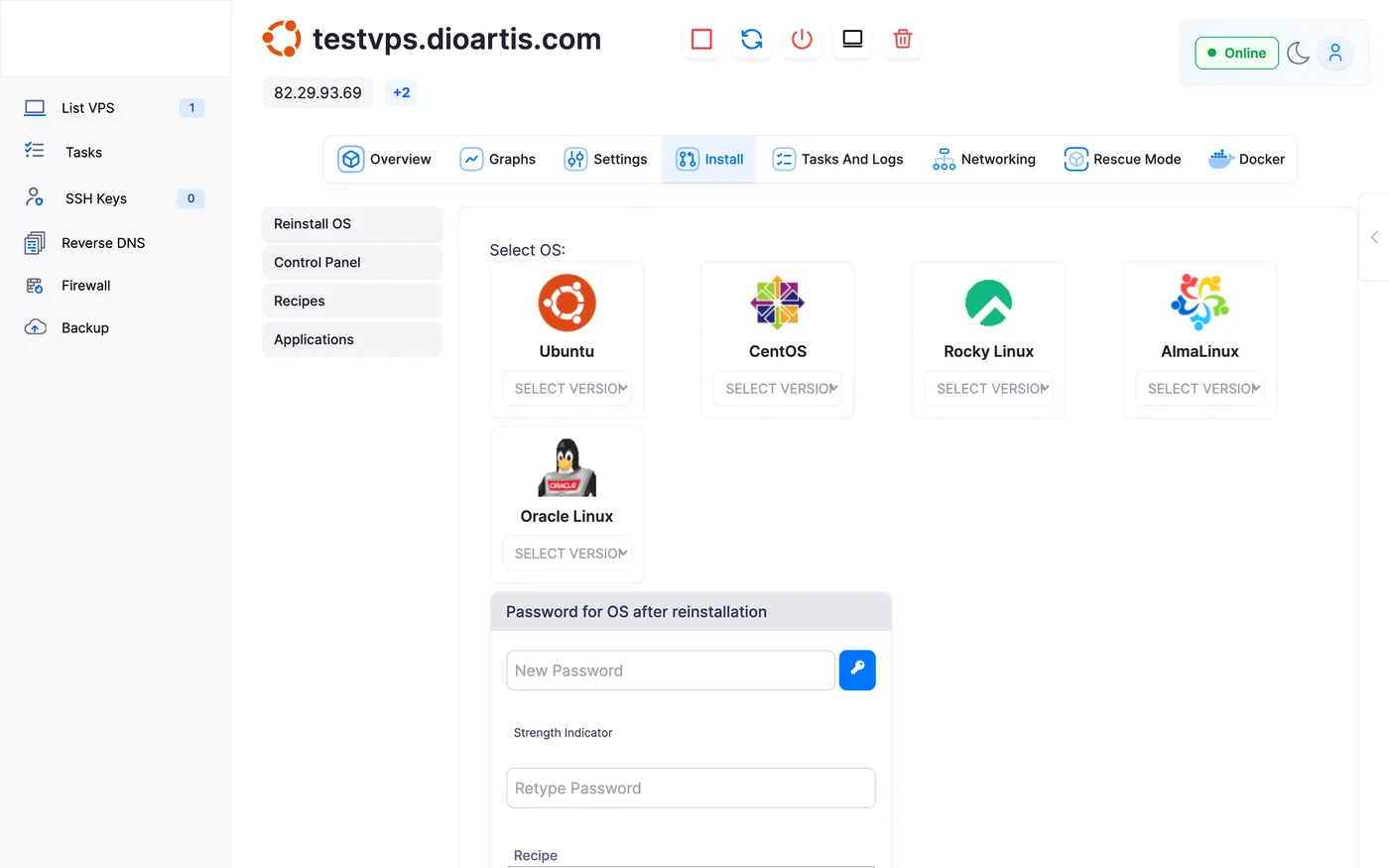
- Client Area → your VPS → Enduser Panel
- Open the Install tab → Reinstall OS
- Select the OS family and version
- Set the new root password, then confirm — this wipes the disk
- Wait for the task to finish, then SSH with the new password
After reinstall
SSH in, run system updates, re-apply firewall/SSH hardening, and restore your apps from backups.
Warning: Reinstall destroys all data on the VPS. Backups and off-server copies are your safety net.
When to contact support
If reinstall fails mid-way or the wrong template list appears, open a ticket with the service ID and desired OS.
Was this helpful?
Thanks for your feedback!